 Phys 5b-13!
| Differences between revisions 119 and 126 (spanning 7 versions) | Back to page |
|
Size: 6805
Comment:
|
Size: 7383
Comment:
|
| Deletions are marked like this. | Additions are marked like this. |
| Line 1: | Line 1: |
| = Midterm 2 = '''<<la("EX02-Solutions.pdf", "Midterm 2 with solutions")>>''' {{{#!wiki comment * <<color("Correction:")>> One angle in the solution for problem 14 was wrong! It is now corrected. If your grade was affected by this, you should let me know!!! – ~-''<<DateTime(2013-03-04T14:12:46-0800)>>''-~ }}} <<lia("Midterm2.png")>> '''<<la("EX02-Review.pdf", "Practice Exam 2 Review Sheets")>>'''. Review session photos: <<la("IMG_3676.JPG", "Photo 1")>> <<la("IMG_3677.JPG", "Photo 2")>> <<la("IMG_3678.JPG", "Photo 3")>>. '''<<la("Practice Exam 2.pdf", "Practice Exam 2")>>''': Feel free to present/discuss your solutions/questions on forum! '''<<la("physics5Bproblems2.pdf", "Practice Exam 2 (additional problems by Eric)")>>''': Feel free to discuss these as well! (<<ln("http://www.ericreichwein.com/courses/#sec2", Solutions)>>) |
|
| Line 19: | Line 3: |
| * <<la("HW01-Sols.pdf", "Set 1 (MP)")>>, <<la("HW02-Sols.pdf", "Set 2")>>, <<la("HW03-Sols.pdf", "Set 3")>>, <<la("HW04-Sols.pdf", "Set 4")>>, <<la("HW05-Sols.pdf", "Set 5")>> | * <<la("HW01-Sols.pdf", "Set 1 (MP)")>>, <<la("HW02-Sols.pdf", "Set 2")>>, <<la("HW03-Sols.pdf", "Set 3")>>, <<la("HW04-Sols.pdf", "Set 4")>>, <<la("HW05-Sols.pdf", "Set 5")>>, <<la("HW06-Sols.pdf", "Set 6")>>, <<la("HW07-Sols.pdf", "Set 7")>>, <<la("HW08-Sols.pdf", "Set 8")>> |
| Line 26: | Line 10: |
| * <<color("Addition:")>> Some more materials in pages 12-14. Also, please note the use of $I_R$ in describing the intensity of diffraction grating (instead of $I_0$, as in lecture). – ~-''<<DateTime(2013-03-04T17:28:37-0800)>>''-~. | |
| Line 32: | Line 17: |
* <<color("Correction and addition:")>> Page 2, Eq. 20.3, corrected (as promised during the lecture today). A paragraph added after it. – ~-''<<DateTime(2013-03-06T17:27:02-0800)>>''-~ |
|
| Line 101: | Line 89: |
| == Midterm 2 == '''<<la("EX02-Solutions.pdf", "Midterm 2 with solutions")>>''' {{{#!wiki comment * <<color("Correction:")>> One angle in the solution for problem 14 was wrong! It is now corrected. If your grade was affected by this, you should let me know!!! – ~-''<<DateTime(2013-03-04T14:12:46-0800)>>''-~ }}} <<lia("midterm2.png", scale=0.6)>> '''<<la("EX02-Review.pdf", "Practice Exam 2 Review Sheets")>>'''. Review session photos: <<la("IMG_3676.JPG", "Photo 1")>> <<la("IMG_3677.JPG", "Photo 2")>> <<la("IMG_3678.JPG", "Photo 3")>>. '''<<la("Practice Exam 2.pdf", "Practice Exam 2")>>''': Feel free to present/discuss your solutions/questions on forum! '''<<la("physics5Bproblems2.pdf", "Practice Exam 2 (additional problems by Eric)")>>''': Feel free to discuss these as well! (<<ln("http://www.ericreichwein.com/courses/#sec2", Solutions)>>) == Midterm 1 == |
Homework Solutions
Lecture Notes
Lecture 21, Mar 04: Complex number and many things it can do
Addition: Some more materials in pages 12-14. Also, please note the use of $I_R$ in describing the intensity of diffraction grating (instead of $I_0$, as in lecture). – 6:28PM, Mar 04, 2013.
Update: This lecture note has gone through a serious proof reading. Two sign errors were corrected, and many small changes were made throughout the text. Update highly recommended! Also, please find and report bugs! – 7:24PM, Mar 03, 2013
Lecture 20, Mar 01: Diffraction (clicker questions)
Correction and addition: Page 2, Eq. 20.3, corrected (as promised during the lecture today). A paragraph added after it. – 6:27PM, Mar 06, 2013
Update: Page 2, Lisa box, some typos corrected. – 9:32AM, Mar 03, 2013
Lecture 17, Feb 20: (clicker questions (some not done in class))
Lecture 16, Feb 15: Young’s double slit experiment (clicker questions (some not done in class))
Lecture 15, Feb 11: Magnifying power
Lecture 13,14, Feb 8: Master equation. Real or virtual? (clicker questions)
Lecture 12, Feb 6: Mirrors, Refraction, Dispersion
Addition: Word "vertical" and a parenthetical remark in page 4 (red). – 2:39AM, Feb 07, 2013
Lecture 11, Feb 4: Spherical and plane mirrors (clicker questions (one not done in class))
Lecture 10, Feb 1: Sound and Light
Proof reading: Some English corrections (red). – 9:51AM, Feb 02, 2013
Lecture 9, Jan 30: Reflection, Standing wave (clicker questions (some not done in class))
Lecture 8, Jan 25: Frequency, Energy, Boundary condition
Addition: Section 8.3. Full answer to this question. – 10:40AM, Jan 27, 2013
Lecture 7, Jan 23: Sound wave, Superposition, Interference (clicker questions)
Addition: Last paragraph: "Generally" and the last sentence replaced. (red) – 8:19AM, Jan 25, 2013
Lecture 6, Jan 18: Wave velocity examples
Lecture 5, Jan 16: Harmonic wave, Wave number/velocity, T and L wave (clicker questions)
Addition: Page 1: "travelling" (red). Also, in the section title. – 8:43AM, Jan 17, 2013
Lecture 4, Jan 14: Rotational simple harmonic oscillators, Waves
Change: Section numbers. – 1:12PM, Jan 14, 2013
Lecture 3, Jan 11: Simple harmonic oscillation (clicker questions)
Correction: Page 1: couple of sentences (red). – 11:18AM, Jan 12, 2013
Lecture 2, Jan 9: Simple harmonic oscillation (clicker questions)
Addition: Page 2: Lisa box, a URL link. – 2:24PM, Jan 13, 2013
Lecture 1, Jan 7: Hooke’s law
Exams
Midterm 2
Correction: One angle in the solution for problem 14 was wrong! It is now corrected. If your grade was affected by this, you should let me know!!! – 3:12PM, Mar 04, 2013

Practice Exam 2 Review Sheets. Review session photos: Photo 1 Photo 2 Photo 3.
Practice Exam 2: Feel free to present/discuss your solutions/questions on forum!
Practice Exam 2 (additional problems by Eric): Feel free to discuss these as well! (Solutions)
Midterm 1
Midterm 1: Midterm 1, with solutions
Review materials (1), Review materials (2): Even if you attended the review session, these files may be beneficial (first file debugged; note red parts in the second file).
Practice Exam: Feel free to present/discuss your solutions/questions on forum!
Note: All questions are discussed on the forum, with answers. Click "SQ" above. – 11:36PM, Jan 26, 2013
Some more materials for your review, from your MSI TA: Thanks, Eric!!
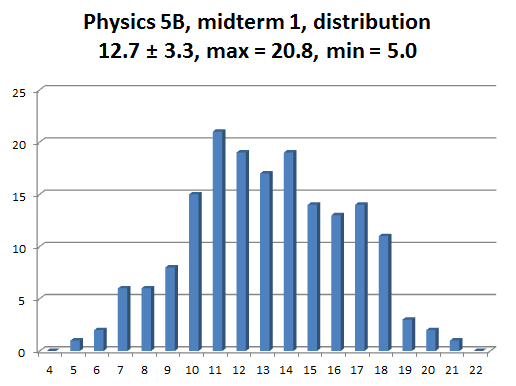 Here is the distribution of scores for the midterm 1. The average is about 58 %, which is OK, but not great. The distribution is almost like a bell curve, but it appears to have a slight bulge at 11 and also another weaker bulge at 17 or 18. I am a bit worried about the points 11 and below. Points 17 and above could be roughly regarded as the A range (i.e., A- or higher), I think, if only this exam is to be looked at.

Looking for the old reading-quiz links? Just click "RQ" near the top.